Multi-Controller Searchtool All controllers. One search.
MAC address, SSID, device name, or site — the SearchTool searches all network controllers simultaneously and delivers results in seconds.
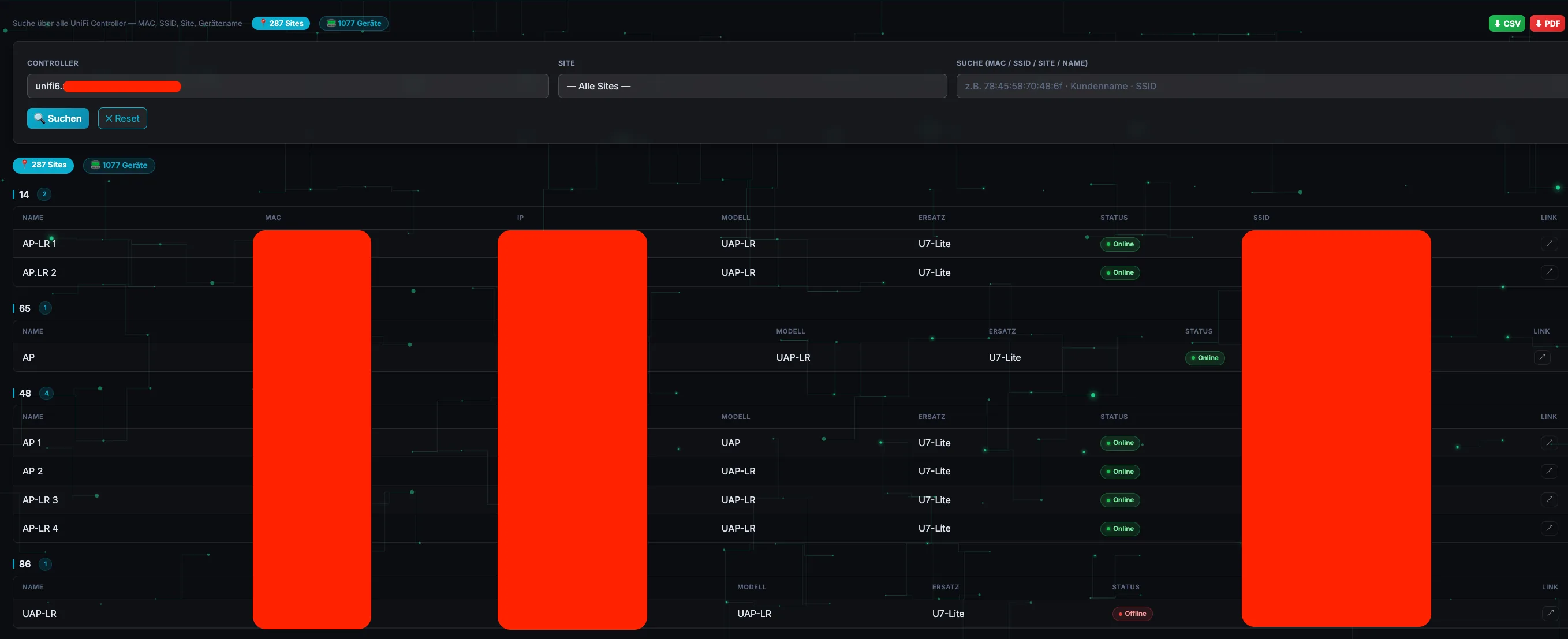
What the SearchTool can do Built for IT service providers and network admins managing multiple network environments.
Multi-controller search
All configured network controllers are searched simultaneously — one request, all results.
Search by MAC, SSID, name
Flexible search term: MAC address, SSID, device name, or site name — finds anything that matches.
Export CSV & PDF
Export results directly as a structured CSV file or formatted PDF — for reports and customer documentation.
Encrypted credentials
Controller passwords are stored Fernet-encrypted. No plain text in the database.
Multi-user & roles
Admin and regular users with their own login. Admins manage controllers — users have search access.
Self-hosted & Docker
Runs locally via Docker — no cloud, no external dependencies. Data stays within your own network.
Installation
Search Tool – Installation Guide
Searches multiple UniFi controllers simultaneously for MAC addresses, SSIDs, site names, or device names. Runs entirely via Docker.
---
Requirements
| Requirement | Details | |---|---| | Docker | ≥ 24.x | | Docker Compose | ≥ v2 (Plugin docker compose) | | Python 3 | For manage.sh (update logic, no unzip needed) | | RAM | Minimal (< 512 MB) |
System Support
- Linux (Ubuntu 22.04+, Debian 11+, Rocky/AlmaLinux 9)
- UGREEN NAS (DXP and NASync series with Docker support)
- Synology NAS (DSM 7.2+, Container Manager)
- Proxmox LXC (with Docker installed)
---
Directory Structure After Installation
searchtool/                     ← installation folder
├── manage.sh                   ← management script
├── docker-compose.yaml
├── .env                        ← created from .env.example (on first update)
├── .env.example                ← template (never edit manually!)
├── app.py
├── templates/
├── static/
└── data/                       ← persistent data (never overwritten)
    ├── users.json               user credentials
    ├── controllers.json         encrypted controller credentials
    ├── .secret_key               Flask session key
    └── .fernet.key                encryption key for controller passwords
---
New Installation (Initial Setup)
Step 1 – Create installation folder
mkdir -p /opt/searchtool
cd /opt/searchtool
UGREEN/Synology NAS: Recommended path: /volume1/docker/searchtool
Step 2 – Place files
Copy searchtool_release.zip and manage.sh into the installation folder.
/opt/searchtool/
├── searchtool_release.zip
└── manage.sh
Step 3 – Make manage.sh executable
chmod +x manage.sh
Step 4 – First update / installation
./manage.sh update
The script:
- Extracts the ZIP (via Python 3, no
unzipneeded) - Creates
.envfrom.env.example(only the first time — an existing.envis left untouched) - Builds the Docker image and starts the container
Step 5 – Adjust configuration
nano .env
Important values:
TZ=Europe/Berlin
APP_PORT=5050

# Generate a random value: python3 -c "import secrets; print(secrets.token_hex(32))"
SECRET_KEY=change_me_to_a_random_secret

# Controllers as a JSON array (single line)
# Each controller needs: name, url, username, password
# verify (optional, default: true) – set to false for self-signed certificates
CONTROLLERS=[{"name":"my-controller","url":"https://unifi.example.com","username":"readonly","password":"secret","verify":true}]

# Optional fine-tuning
# REQUEST_TIMEOUT=12
# SEARCH_WORKERS=8
# PDF_MAX_ROWS=1500
# JOB_MAX_AGE_SECONDS=3600
Important:SECRET_KEYmust be a long random value — without your ownSECRET_KEY, the app automatically generates a persistent key underdata/.secret_keyon first start.
The controllers from CONTROLLERS are imported once into data/controllers.json (encrypted) on first start. After that, they can be conveniently managed via the web interface under Admin (add, edit, delete, import via JSON file) — CONTROLLERS in .env is no longer needed afterwards.
Step 6 – Restart container (after configuration changes)
./manage.sh restart
---
Accessibility
| Service | URL | |---|---| | UniFi Search Tool | http://<IP address>:5055 |
Default login: admin / admin — please change immediately after the first login via Admin → Users.
---
Update (Existing Installation)
- Place the new
searchtool_release.zipin the installation folder - Start the update:
./manage.sh update
What happens during the update:
- Code files (
app.py,templates/,static/, …) are updated .envremains unchanged (not overwritten)- The
data/folder is not touched (users, controllers, keys are preserved) - Docker image is rebuilt and the container restarted
- The ZIP is renamed after the update (as an archive,
*.deployed_<timestamp>.zip)
---
Watch Mode (Automatic Updates)
Watch mode checks every 30 seconds for a new searchtool_release.zip and deploys it automatically.
./manage.sh watch
To start as a background service:
nohup ./manage.sh watch > logs/watch.log 2>&1 &
---
manage.sh – All Commands
./manage.sh update              # update from searchtool_release.zip
./manage.sh update file.zip     # update from a specific ZIP
./manage.sh watch               # watch mode: new ZIP → auto deploy
./manage.sh start               # start container
./manage.sh stop                # stop container
./manage.sh restart             # restart container
./manage.sh status              # show container status
./manage.sh logs                # show logs (live)
---
Features
- Parallel search across multiple UniFi controllers and sites (MAC, SSID, site, device name)
- Location grouping: devices within a site are automatically grouped by detected location (street + house number)
- Automatic replacement suggestions for discontinued legacy models ("Replacement" column)
- Export as CSV and PDF (including location grouping and replacement column)
- Device model mapping with automatic detection of missing model names
- User management (roles: admin/user), login also possible against system users (
/etc/shadow) - SSO integration (token-based) for embedding in other tools
- Light/dark mode
---
Troubleshooting
Container doesn't start
./manage.sh logs
Login fails / forgotten password
Admin credentials are stored in data/users.json (bcrypt hash). Generate a new hash:
python3 -c "import bcrypt; print(bcrypt.hashpw(b'new_password', bcrypt.gensalt()).decode())"
and enter it for the desired user in data/users.json, then run ./manage.sh restart.
Controller login fails
- Check the URL in Admin (must include the port, e.g.
https://unifi.example.com:8443, without a trailing/) - For self-signed certificates: disable "Verify SSL certificate"
- Controller firewall: access from the server running the Search Tool must be allowed
Port 5055 not reachable
./manage.sh status
docker compose ps
docker compose not found
docker compose version
# If not available, update Docker or install the Compose plugin
UGREEN NAS: Permission denied for manage.sh
chmod +x manage.sh
# Or run directly:
sh manage.sh update
---
Uninstallation
./manage.sh stop
docker compose down --volumes --rmi all
Warning:--volumesdeletes all persistent data including users and controller credentials. Without--volumes, the data in thedata/folder is preserved.
Multi-controller search — buy once, use forever. Plus 19% VAT.
Price plus 19% VAT. One-time payment, no subscription costs, self-hosted.
- Multi-controller search (simultaneous)
- Export as CSV & PDF
- Multi-user with role management
- Fernet-encrypted controller credentials
- Docker-based, self-hosted
- One-time payment — no subscription